




Since 30 June 2020, the QR-bill has been in use in Switzerland, an innovation introduced as part of the adaptation to international standards ISO 20022 and increased regulatory requirements. After a transition period that ran until 30 September 2022, the QR-bill has completely replaced the traditional red and orange payment slips. This modern form of invoicing greatly simplifies payment transactions and offers an efficient and secure payment solution for both domestic and international transactions.
What is a QR-bill?
A QR-bill is a machine-readable invoice used in the Swiss financial industry. The black-and-white document is divided into two sections, the receipt and the payment section. The receipt serves as proof of payment for a cash deposit. The payment section contains the QR code, which provides all the information required for the payment. In addition, the necessary data is also listed in written form on the payment section.
Creating a QR-bill – How it works
To create QR-bills, you need a QR-IBAN number and your customer identification number. You receive both either automatically or on request, free of charge, from your house bank. While the QR-IBAN number is mandatory, the customer identification number is not necessarily required for creating a QR-bill. Online, there are various ERP software solutions that can be used to create QR-bills. Payment Standards.ch provides a list suggesting suitable software products. In principle, invoices can still be designed freely. However, when designing the payment section, care must be taken to ensure that it complies with the specifications of the style guide for QR-bills. In addition, when creating them, the requirements of the Implementation Guidelines must be observed. The Swiss QR code, which can be found in the payment section, contains all the information required for payment. This includes, for example, details of the payee and payer, as well as amount and currency. The code can also contain additional information that is useful for accounting. A complete list of the contents can be found in the Implementation Guidelines.
New QR-bill: What changes for standing orders
With the introduction of the QR-bill in Switzerland, the requirements for standing orders also changed: Since 1 October 2022, standing orders based on orange payment slips are no longer valid. It therefore remains important that you check your existing standing orders and, if you have not already done so, switch them to the QR-bill system that has been in place since October 2022. Every QR-bill includes a QR code that contains all relevant payment information, including the QR-IBAN and QR reference. Update your standing orders by replacing the conventional account details with the new QR code information. This is crucial to ensure smooth payments going forward and to guarantee a seamless transition to the modern payment system. This way, you avoid interruptions in your regular payments.
QR codes – the technology behind the new payment slip
How does the QR-bill differ from the original payment slip? As the name suggests, the QR-bill differs through the integrated QR code. A Quick Response code (= QR code) is a black-and-white checkered pattern into which extensive information can be embedded. The matrix of black-and-white squares can be decoded by reading devices such as QR readers, PC cameras and smartphones.
How can you pay with the QR payment slip?
The available payment options remain the same. The QR code merely saves users from having to enter payment information such as account and reference numbers. This significantly speeds up the payment process. The following options are available for settling a QR code invoice: • E-banking – To pay, open the e-banking portal, scan the QR code with your computer camera and pay with a click. • Mobile banking – The invoice is paid by opening your mobile banking app on your smartphone. The QR code is read by the phone camera using the integrated QR reader function and the payment is triggered with a tap of your finger. • Post–Ident – as with the previous payment slip, you can still use the post office counter and deposit machine, as well as a payment order in an envelope to pay a QR-bill.
What should you bear in mind when paying with the payment slip?
Although this technology is reliable, you should always compare the information read from the QR code with the written information on the QR-bill.
What versions of the QR-bill are available?
The QR-bill in Switzerland offers three tailored variants to meet the different needs of companies and private individuals. Each of these variants is characterized by specific features that make it particularly suitable for certain use cases. From solutions for smaller businesses with less frequent transactions to options for large companies with a high volume of payments and international business relationships, the QR-bill covers a wide spectrum. This enables flexible adaptation to the individual needs of invoicing parties.
QR-bill with IBAN without reference
This variant is suitable for billers who only record incoming payments occasionally. The payments are credited individually directly to the account. The regular IBAN is used here, which can also be found in e-banking or on account statements. 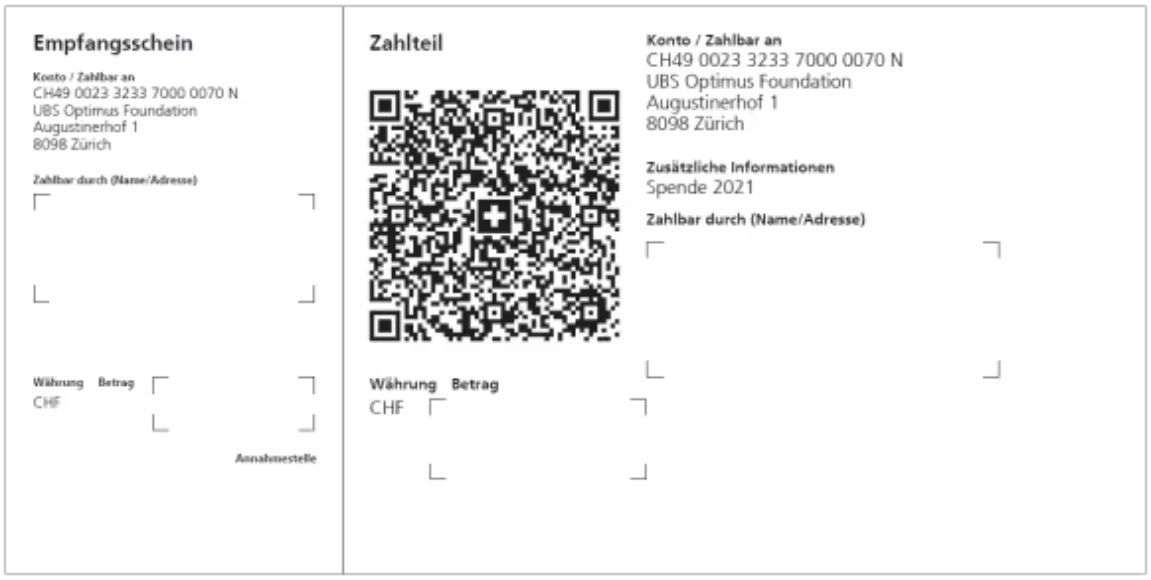
QR-bill with QR-IBAN and QR reference
Ideal for billers with a high number of invoices. With this form, credits are posted to the account as collective bookings. The reconciliation of debtors is carried out using the QR reference number. For this variant, the use of a QR-IBAN is necessary. You can obtain further information from your financial advisor. 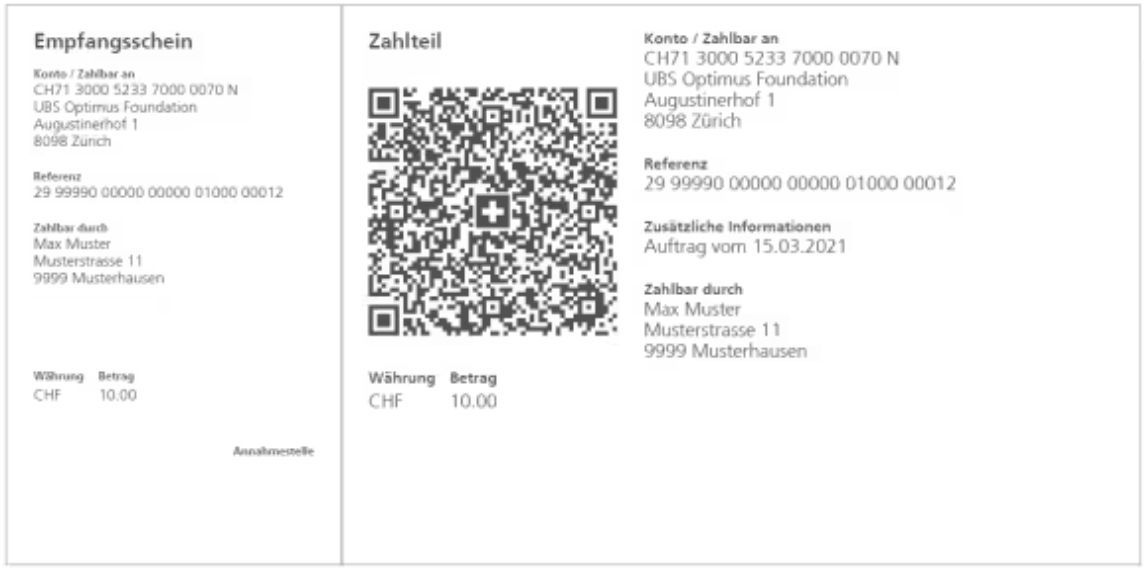
QR-bill with IBAN and Creditor Reference
This version of the QR-bill is particularly suitable for invoicing in the European SEPA area, as it uses an internationally standardized reference (Creditor or RF reference in accordance with ISO 11649). Here too, the normal IBAN is used for transactions. Credits are posted as individual bookings. 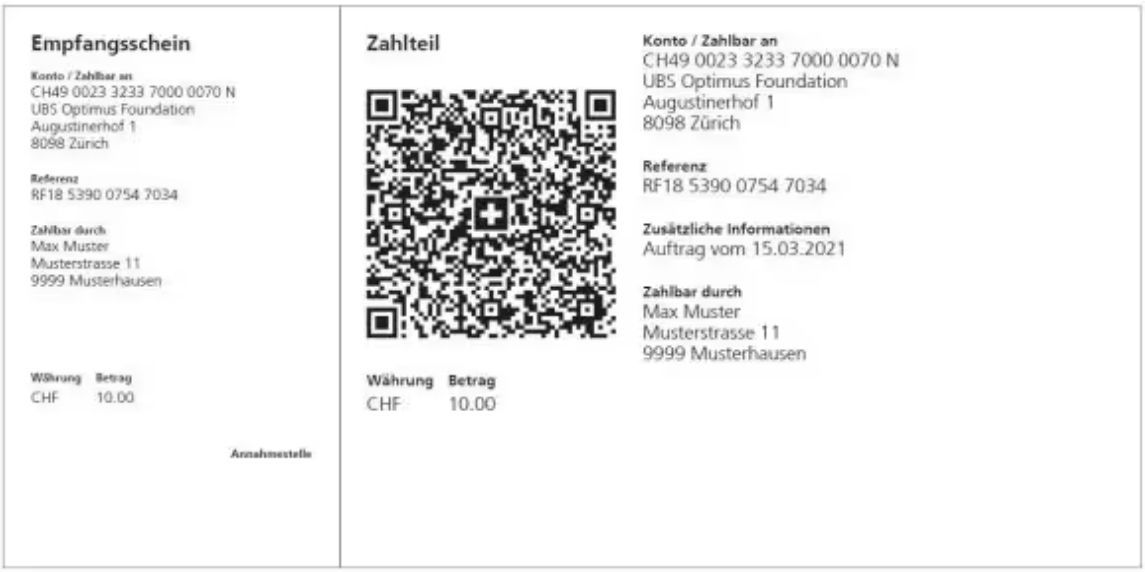
Creating a QR-bill – what to watch out for!
Physical aspects
Basically, the idea behind the QR-bill is that payment transactions take place digitally. However, if the QR-code invoice is printed out, you must ensure that the payment section can visibly be separated from the rest of the invoice. There are three ways to implement this requirement.
- a perforated payment section
- a line with a scissors symbol
- a line outside the payment section with the note “Detach before payment” More detailed information on printing QR-bills can be found in the Implementation Guidelines. Printers that provide suitable material have been compiled in a list by the Swiss financial sector.
Legal aspects
- If you print independently, you are under no obligation to have the payment section checked or approved by a financial institution. A check of the payment section for correctness is only planned if the invoicing party or the financial institution explicitly requests it.
- Billers and software manufacturers have two options for self-checking. On the one hand, there is the grid sheet included in the style guide and, on the other, validation platforms. The grid sheet provides precise information on where information must be placed in the context of the QR-bill.
- Poorly printed Swiss QR code bills can cause disruptions in the payment process and may therefore be rejected.
Content-related aspects
The purpose of payment can now be found under the terminology “Additional information”. If QR-bills are not printed independently, there is the option at some financial institutions to order pre-printed payment sections with or without payment reference. If not pre-printed, the name and address of the payer as well as the amount to be paid may be added by hand. The additions must be made in colourless fields with corner markers. Apart from these exceptions, no handwritten additions are permitted. To create QR-bills, you can use one of the numerous QR generators.
Switch to the QR code payment slip
With regard to the switch to QR-bills, action is required both for companies with invoicing software and for those without. In any case, the changeover should be announced early to partners, customers and employees. This gives them sufficient time for any arrangements and preparations.
Switch without software
Even after the end of the transition period to the QR-bill in October 2022, the purchase of accounts payable/accounts receivable software can still be beneficial for companies that work without such systems. Depending on company processes, such software solutions can contribute to considerable cost savings. However, if you wish to continue working without this software, it is important to take into account the switch to QR payment slips and observe the following points:
Use of payment slips
Since the full switch to QR-bills in October 2022, traditional payment slips are no longer in use. It is therefore essential to fully switch to processing and using QR-bills. All financial institutions now offer QR-bills only.
Settlement of outstanding receivables
To settle outstanding receivables that were previously processed via payment orders, it is now necessary to adapt to the QR-bill system. QR-bills can be entered and processed via e-banking systems. The use of tools such as document readers that can recognize QR codes is recommended for efficient handling of these processes.
Accounting
In accounting, it is now important to integrate the processing of QR-bills. The use of account statements as well as debit and credit advices continues, but with the need to take QR-bills into account accordingly. For companies whose accounting is handled by a trustee, it should be ensured that they too have switched to processing QR-bills.
Switch with software
Do you use accounts payable/accounts receivable software? Then you should make sure that your software meets the increased requirements. As regards switching with software, similar points need to be considered as for switching without software. However, the necessary conversion tasks lie with the provider. If you want to determine whether your software still meets your needs, you should be able to tick off the following points:
- the software is able to print outgoing QR invoices
- the software is able to process incoming QR invoices
- open receivables can be reconciled via file transfer from your payment software or from your e-banking
- invoicing with QR-bills is possible
- the software can handle credits from QR-bills If your current financial software does not meet these requirements, an update or a change of software provider may be necessary. In the next step, you should ensure that your hardware is up to date (e.g. reading devices, printers). Determine whether your scanning software, document reader or app is capable of reading a Swiss QR code.